Shakespeare on Draught
Home
Main Website
Donate
Donate by Credit Card
Donate by PayPal
Get The App
Get the App
Instructions for Android
Instructions for iPhone
Back
Shakespeare on draught
Copyright © 2020 — 2026 SOD
Home
Main Website
Donate
Donate by Credit Card
Donate by PayPal
Get The App
Website Design by CarlChapmansr.com
Add Donate to Shakespeareondraught to your Homescreen!
ADD
Close this module
Get the iPhone App
In five easy steps.
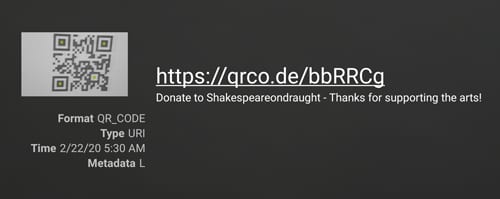
Step 1 - Scan the QR Code
Step 2 - Click the Link
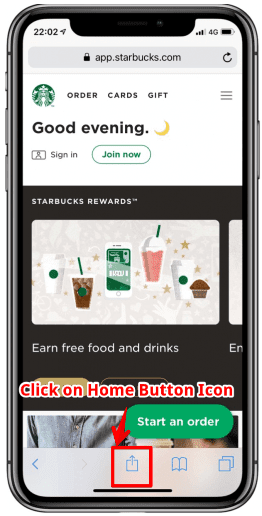
Step 3 - Click on the Home button in Safari for the PWA you’re using like below the screenshot.
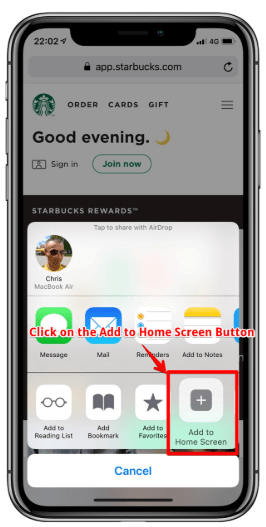
Step 4 - Click on the “Add to Home Screen” icon like below the screenshot.
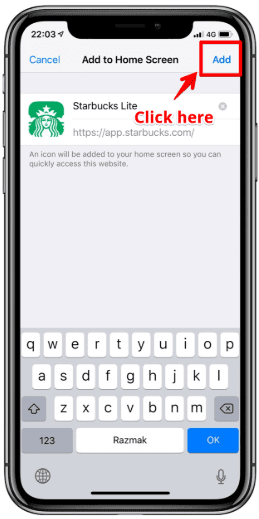
Step 5 – Now click on the Add in the upper-right corner like below the screenshot.
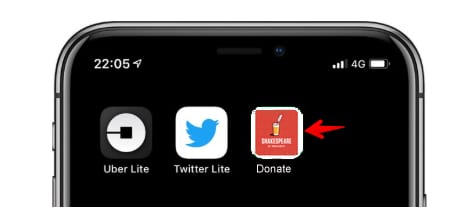
That's is, your app is now on your home screen or in your apps drawer.
Close this module
Get the Android App
In three easy steps.
Step 1 - Scan the QR Code
Step 2 - Click the Link
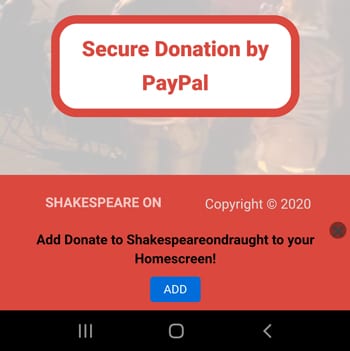
Step 3 - Scroll Down & Click "ADD" Button
That's is, your app is now on your home screen or in your apps area.
linkedin
facebook
pinterest
youtube
rss
twitter
instagram
facebook-blank
rss-blank
linkedin-blank
pinterest
youtube
twitter
instagram